How Plexus Technolabs Helps SMEs Send Qualified WhatsApp Leads Directly to Any CRM
A campaign can generate a promising enquiry in seconds. The difficult part is making sure that enquiry reaches the right salesperson without someone copying information from WhatsApp into a spreadsheet or CRM.
That was the challenge faced by Pelec Cable & Metals LLP. The company was using WhatsApp and campaign-led enquiries to connect with potential customers. Once an enquiry became qualified, the business needed a more dependable way to send the lead into its CRM and make it available to the sales team. This type of connected workflow reflects Plexus Technolabs’ business transformation approach.
The requirement was not to move every WhatsApp conversation into the CRM. A casual question or incomplete response did not need to become a sales record. The requirement was more specific: when a campaign produced a qualified lead, that lead should go directly into the CRM already used by the business, followed by the right sales assignment.
What problem was Pelec Cable & Metals LLP facing?
Connecting WhatsApp leads to CRM is a common challenge for businesses generating enquiries through WhatsApp and social media campaigns. The difficult part is making sure each qualified enquiry reaches the right salesperson without someone copying information from WhatsApp into a spreadsheet or CRM.
What did Plexus Technolabs understand first?
How to Connect WhatsApp Leads to CRM: The Six-Step Workflow
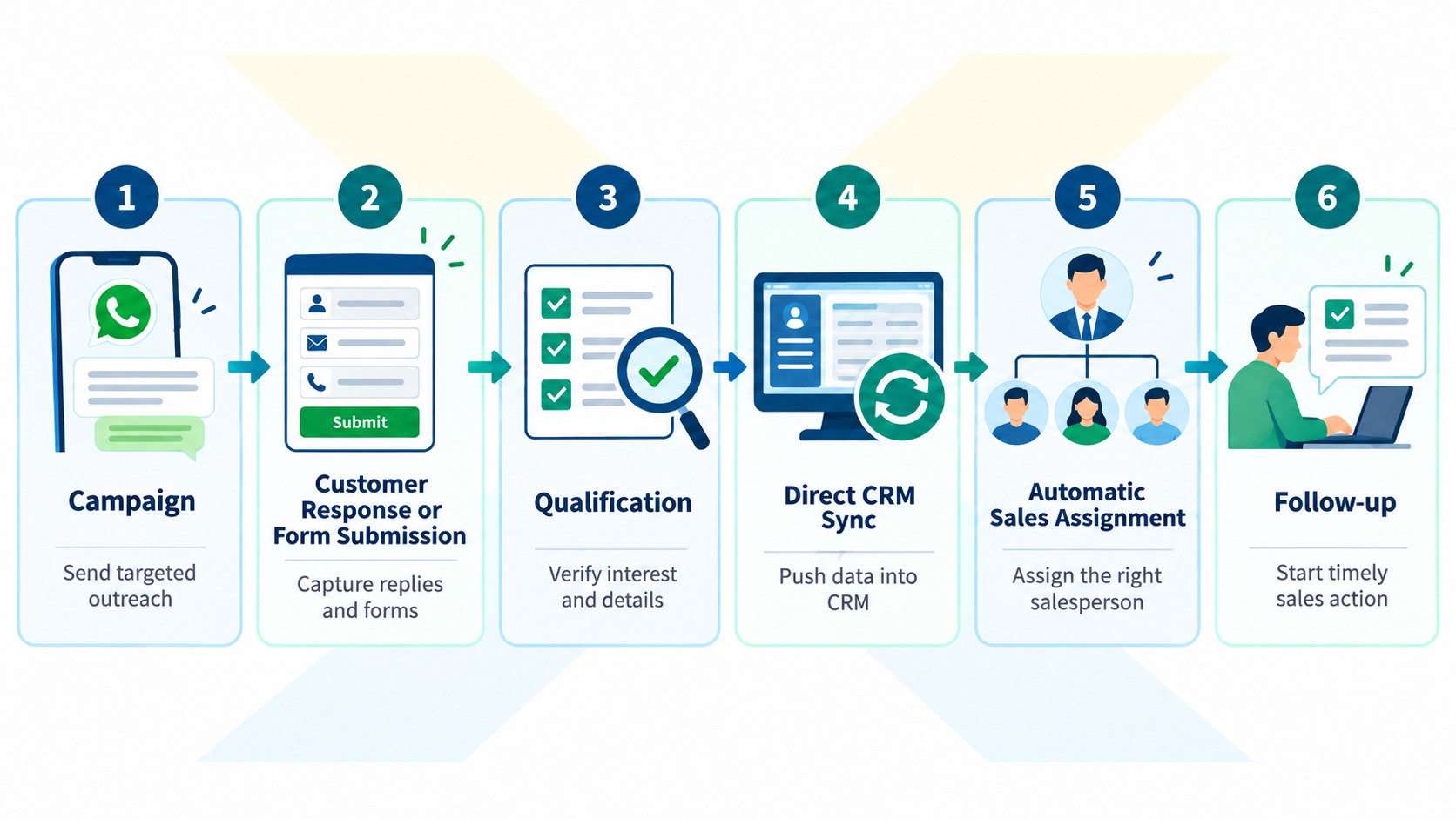
The agreed workflow followed six practical stages.
1. Campaign
A WhatsApp, social media, or form-based campaign created the initial response. Campaign information such as the source, product interest, location, or campaign name could be associated with the enquiry.
2. Customer response or form submission
The potential customer replied on WhatsApp or submitted information through a connected form. These two sources could provide different fields, so the required information had to be mapped clearly.
3. Qualification and lead capture
The response was checked against the agreed qualification criteria. Once the enquiry met those criteria, the relevant information was captured, including the customer’s name, phone number, requirement, source, campaign, and conversation context.
4. Direct CRM sync
The qualified lead was sent directly to the CRM through the appropriate integration route, such as an API, webhook, connector, or middleware workflow.
5. Automatic sales assignment
6. Follow-up
This was the complete journey:
Why was direct CRM delivery important?
Marketing could maintain the campaign source. The integration could handle the data movement. Sales could receive a structured CRM record with the information needed for follow-up.
This also made the workflow easier to manage. The business could decide what counted as a qualified lead and how that lead should be assigned. Plexus could then connect the systems around those decisions instead of sending every conversation into the CRM.
Can the same solution work with any CRM?
The CRM does not have to be a particular brand. The integration method may change depending on the system, but the business requirement remains the same.
A qualified campaign lead should be created or updated in the CRM that the sales team already uses. That may be a custom-built CRM, an established business platform, or an enterprise system.
According to Meta’s official WhatsApp Webhooks documentation, webhooks send HTTP requests containing JSON event data to a designated server, including information about incoming messages and other WhatsApp events.
What should an SME define before starting?
Before connecting WhatsApp leads to your CRM, define:
- What makes a lead qualified and which CRM stage receives it
- Who owns the lead and what happens if information is missing
- Test with real cases - new leads, duplicates, and incomplete responses
- Sales must trust the record, know its source, and know what to do next
Still copying WhatsApp leads into your CRM manually ?
Frequently asked questions
How to Connect WhatsApp Leads to CRM for Qualified Campaign Enquiries?
Use the WhatsApp Business Platform or a suitable integration layer to receive campaign responses, apply the qualification rules, map the required CRM fields, and create or update the lead in the CRM.
How does WhatsApp CRM lead routing work?
The integration reads fields such as location, product, language, customer type, or source and applies assignment rules. A fallback queue can receive leads when no rule matches.
What information should be sent to the CRM?
At minimum, send the customer’s name, phone number, requirement, source, campaign, conversation reference, and assigned owner. Add other fields only when the sales team uses them..
How can Plexus Technolabs help with this integration?
Plexus can understand the campaign qualification process, identify manual handoffs, and connect qualified leads to the custom-built or enterprise CRM the business already uses, including the required assignment logic.